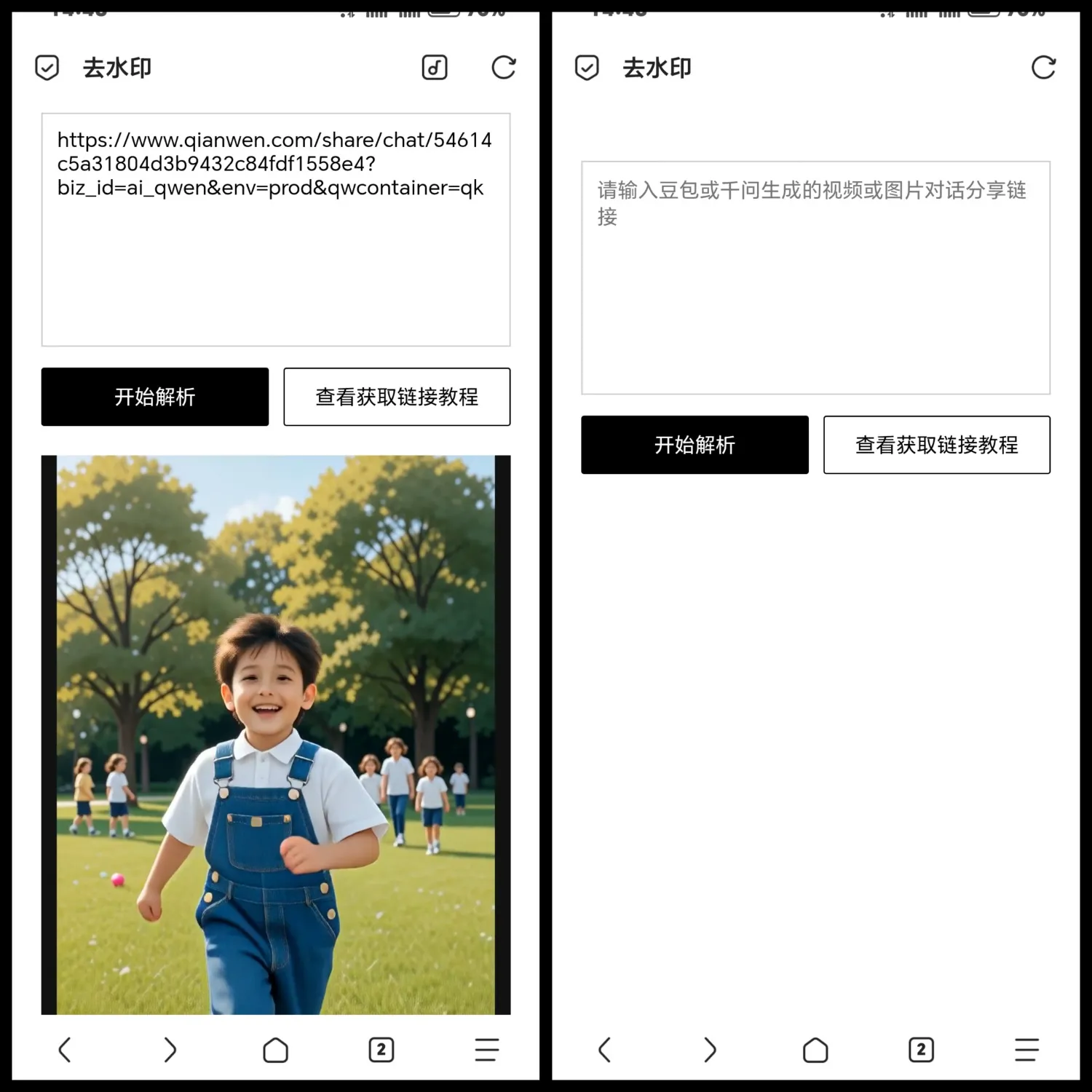




复制代码另存为html
<!DOCTYPE html>
<html lang="zh-CN">
<head>
<meta charset="UTF-8">
<meta name="viewport" content="width=device-width, initial-scale=1.0">
<title>去水印</title>
<script src="https://cdn.jsdelivr.net/npm/swiper@11/swiper-bundle.min.js"></script>
<link rel="stylesheet" href="https://cdn.jsdelivr.net/npm/swiper@11/swiper-bundle.min.css">
<style>
*{margin:0;padding:0;box-sizing:border-box;font-family:system-ui}
body{max-width:600px;margin:40px auto;padding:0 20px}
textarea{
  width:100%;height:160px;padding:10px;
  border:1px solid #ccc;margin-bottom:10px;
  resize:none
}
.btns{display:flex;gap:10px;margin-bottom:20px}
button{
  flex:1;padding:10px;border:1px solid #000;
  background:#fff;cursor:pointer;border-radius:2px
}
#parseBtn{background:#000;color:#fff}
.swiper{
  width:100%;height:400px;background:#111;
  margin-top:20px;display:none
}
.swiper-slide{
  display:flex;align-items:center;justify-content:center;
  position:relative
}
.swiper-slide img{
  max-width:100%;max-height:100%;object-fit:contain;
  background:#fff
}
.swiper-slide video{
  max-width:100%;max-height:100%;object-fit:contain
}
.fallback-btn{
  position:absolute;background:rgba(0,0,0,.7);
  color:#fff;padding:12px 20px;border-radius:4px;
  cursor:pointer;font-size:14px;display:none
}
#tutorialBox{
  width:100%;margin-top:20px;display:none
}
#tutorialBox img{
  width:100%;max-width:100%;border:1px solid #eee
}
</style>
</head>
<body>

<textarea id="inputUrl" placeholder="请输入豆包或千问生成的视频或图片对话分享链接"></textarea>

<div class="btns">
  <button id="parseBtn">开始解析</button>
  <button id="tutorialBtn">查看获取链接教程</button>
</div>

<div id="tutorialBox">
  <img src="http://www.liuxingxiaowu.top/b/b/img.png" alt="教程">
</div>
<div class="swiper mySwiper">
  <div class="swiper-wrapper" id="swiperWrapper"></div>
  <div class="swiper-pagination"></div>
  <div class="swiper-button-prev"></div>
  <div class="swiper-button-next"></div>
</div>

<script>
const inputUrl = document.getElementById('inputUrl');
const parseBtn = document.getElementById('parseBtn');
const tutorialBtn = document.getElementById('tutorialBtn');
const swiperWrapper = document.getElementById('swiperWrapper');
const swiperBox = document.querySelector('.mySwiper');
const tutorialBox = document.getElementById('tutorialBox');
tutorialBtn.onclick = () => {
  tutorialBox.style.display = tutorialBox.style.display === 'block' ? 'none' : 'block';
  swiperBox.style.display = 'none';
};

parseBtn.onclick = async () => {
  const val = inputUrl.value.trim();
  if (!val) return alert('请输入链接');

  parseBtn.textContent = '解析中...';
  tutorialBox.style.display = 'none';
  swiperBox.style.display = 'none';
  swiperWrapper.innerHTML = '';

  try {
    let api = '';
    if (val.includes('doubao.com')) {
      api = `https://liuxingxiaowu.top/b/b/doubao.php?url=${encodeURIComponent(val)}`;//豆包去水印api
    } else if (val.includes('qianwen.com')) {
      api = `https://liuxingxiaowu.top/b/b/qianwen.php?url=${encodeURIComponent(val)}`;//千问去水印api
    } else {
      alert('目前仅支持豆包、千问');
      return;
    }

    const res = await fetch(api);
    const data = await res.json();
    const type = data.type;
    const urls = data.urls;

    urls.forEach(url => {
      const slide = document.createElement('div');
      slide.className = 'swiper-slide';

      if (type === 'video') {
        slide.innerHTML = `
          <video
            src="${url}"
            controls
            playsinline
            preload="auto"
            style="width:100%;height:100%"
            onerror="this.style.display='none';this.nextElementSibling.style.display='flex';"
          ></video>
          <div class="fallback-btn" onclick="window.open('${url}','_blank')">
            播放失败,点击新标签页观看
          </div>
        `;
      } else {
        slide.innerHTML = `<img src="${url}">`;
      }

      swiperWrapper.appendChild(slide);
    });

    swiperBox.style.display = 'block';

    new Swiper('.mySwiper', {
      loop: true,
      pagination: { el: '.swiper-pagination' },
      navigation: { nextEl: '.swiper-button-next', prevEl: '.swiper-button-prev' }
    });

  } catch (err) {
    alert('解析失败:' + err.message);
  } finally {
    parseBtn.textContent = '开始解析';
  }
};
</script>
<div style="margin-top: 30px; text-align: center; font-size: 14px;"><a href="www.396zy.cn" target="_blank" style="text-decoration: none; color: #000;">API随时失效,提供分享学习!</a>
</div></body></html>相关阅读:去水印源码
© 版权声明
THE END


相关推荐







暂无评论内容